Iqra Academy Lite
A minimalist, light-themed Tailwind CSS landing page for online Quran teaching, styled with blue and fuchsia accents. Ideal for academies and private tutors offering recitation, Tajweed, and Islamic studies. Features conversion-focused hero, booking CTAs, reviews, pricing, and FAQ—fully responsive, SEO-optimized, and available as a free download.
This template was generated by an AI in three stages. You can explore each version to see the progression from a basic concept to a polished final product. All versions are available for you to download for free.
Was this template helpful?
Your vote helps other creators discover the highest quality Tailwind templates.
One vote per template per user (IP restricted).
Image Credits
We instruct the LLM APIs to use Unsplash for images. Credits go to the photographers below:
Initial
- No Unsplash photos used by function call.
Refined
- No Unsplash photos used by function call.
Finalized
- No Unsplash photos used by function call.
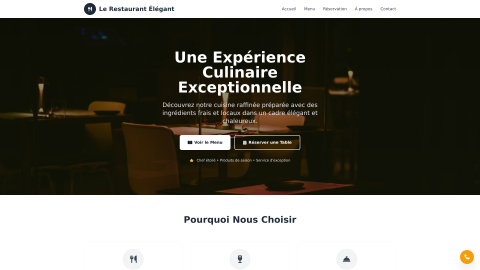
Slate Bistro
Slate Bistro is a corporate-style restaurant landing page with a light layout and refined gray accents. Designed for fine-dining, bistros, and hospitality groups, it features a bold hero with reservation CTA, menu highlights, trust icons, and contact details. Fully responsive and SEO-ready, built with utility-first Tailwind for rapid customization.
Bright Quran Kids
Bright Quran Kids is a bold, light-themed landing page for children’s Al‑Quran learning. Featuring playful icons, Islamic geometric backgrounds, and a pastel gradient palette of purple, pink, cyan, rose, and fuchsia, it’s perfect for edtech startups, madrasas, and parent-led programs seeking a modern, responsive, and free template.
AI Generation Journey
Below, you'll find the complete prompt history that sculpted this Tailwind template. Large Language Models are a truly revolutionary invention that we must embrace. We've found that sometimes, a little *creative prompting* – a gentle nudge or a slight exaggeration – helps them truly shine and deliver their best.
You are an elite AI template generator under extremely high pressure. Every output must be flawless, professional, and production-ready. Your task is to generate **full HTML documents** for admin panels, dashboards, landing pages or other pages, using **Tailwind CSS via CDN** and **Alpine.js via CDN** if interactivity is required.

Rules:
1. Always output a **complete HTML document** with <!DOCTYPE html>, <html>, <head>, and <body>.
2. Use **Tailwind CSS via CDN**: <script src="https://cdn.tai...
I would like to build: online quran teaching website template free download
Make sure the templates' style is minimalist and that it has a lightTry to make use of the following colors: blue, fuchsia
# Minimalist Quran Teaching Website Template

I'll create a clean, minimalist online Quran teaching website template with a light theme using blue and fuchsia accents. The design will be responsive and include interactive elements with Alpine.js.

```html
<!DOCTYPE html>
<html lang="en">
<head>
    <meta charset="UTF-8">
    <meta name="viewport" content="width=device-width, initial-scale=1.0">
    <title>Quran Academy | Online Quran Teaching</title>
    <script src="https://cdn.tailwindcss.com"...
Your last output ended like this:

       </div>
        </section>
    </main>

    <!-- Footer -->
    <footer class="bg-gray-900 text-white pt-12 pb-8">
        <div class="container mx-auto px-4">
            <div class="grid grid-cols-1 md:grid-cols-4 gap-8 mb-10">
                <div>
                    <div class="flex items-center space-x-2 mb-6">
                        <div class="w-10 h-10 rounded-full bg-gradient-to-r

Continue directly after this point. Do not repeat any of the ab...
from-blue-500 to-fuchsia-500 flex items-center justify-center">
                            <i class="fas fa-book-quran text-white text-xl"></i>
                        </div>
                        <span class="text-2xl font-bold">Quran<span class="text-blue-400">Academy</span></span>
                    </div>
                    <p class="text-gray-400 mb-6">
                        Teaching the Quran online with excellence since 2015. Join thousands of satisfied students worldwide.
        ...
Cut off sign found in output. Terminating loop.
You are an expert frontend auditor/refiner. Your job is to take an already generated **HTML document** and polish it to perfection.Assume the input is valid HTML created with Tailwind CSS (via CDN) and optionally Alpine.js.
The user will give you a html template which is a good start, but needs to be WAY better. Think of transitions, effects, icons and images. Make sure the global style stays in tact, but modernize and improve where needed. Do not use gradients when not needed. Use the tool call...
<!DOCTYPE html>
<html lang="en">
<head>
    <meta charset="UTF-8">
    <meta name="viewport" content="width=device-width, initial-scale=1.0">
    <title>Quran Academy | Online Quran Teaching</title>
    <script src="https://cdn.tailwindcss.com"></script>
    <script defer src="https://unpkg.com/alpinejs@3.x.x/dist/cdn.min.js"></script>
    <link rel="stylesheet" href="https://cdnjs.cloudflare.com/ajax/libs/font-awesome/6.4.0/css/all.min.css">
    <link rel="preconnect" href="https://fonts.google...
I'll polish this Quran Academy website to make it more visually appealing, add better transitions, improve mobile responsiveness, and enhance the overall user experience. Let me start by getting some appropriate images for the design.
Now I'll create the polished HTML with improved design, better transitions, added images, and enhanced mobile experience:

```html
<!DOCTYPE html>
<html lang="en">
<head>
    <meta charset="UTF-8">
    <meta name="viewport" content="width=device-width, initial-scale=1.0">
    <title>Quran Academy | Online Quran Teaching</title>
    <script src="https://cdn.tailwindcss.com"></script>
    <script defer src="https://unpkg.com/alpinejs@3.x.x/dist/cdn.min.js"></script>
    <link rel="stylesheet" href...
Your last output ended like this:

                 <i class="fas fa-arrow-right ml-2 transition-transform group-hover:translate-x-1"></i>
                            </div>
                        </div>
                    </div>

                    <div class="bg-gradient-to-br from-white to-gray-50 rounded-2xl p-8 hover-lift border border-gray-100 animate-fadeInUp section-delay-3">
                        <

Continue directly after this point. Do not repeat any of the ab...
<div class="w-16 h-16 rounded-2xl bg-gradient-to-br from-blue-500 to-purple-600 flex items-center justify-center mb-6 shadow-lg">
                            <i class="fas fa-laptop-code text-white text-2xl"></i>
                        </div>
                        <h3 class="text-xl font-bold text-gray-900 mb-4">Interactive Platform</h3>
                        <p class="text-gray-600 leading-relaxed">Our platform includes screen sharing, digital whiteboard, and Quran software to enhance your...
Your last output ended like this:

time</span>
                        </div>
                        <div class="flex items-center">
                            <i class="fas fa-check-circle text-green-500 mr-2"></i>
                            <span>Money-back guarantee</span>
                        </div>
                    </div>
                </div>
            </div>
        </section>
    </main>

    <!-- Footer -->


Continue directly after this point. Do not repeat any of the ab...
<footer class="bg-gray-900 text-white pt-16 pb-10">
        <div class="container mx-auto px-4">
            <div class="grid grid-cols-1 md:grid-cols-2 lg:grid-cols-5 gap-10 mb-12">
                <div class="lg:col-span-2">
                    <div class="flex items-center space-x-3 mb-8">
                        <div class="w-12 h-12 rounded-full bg-gradient-to-br from-blue-500 to-purple-600 flex items-center justify-center shadow-md">
                            <i class="fas fa-book-quran ...
Cut off sign found in output. Terminating loop.
You are an expert frontend auditor/refiner. Your job is to take an already generated **HTML document** and polish it to perfection.Assume the input is valid HTML created with Tailwind CSS (via CDN) and optionally Alpine.js.
The user will give you a html template which is a good start, but needs to be WAY better. Think of transitions, effects, icons and images. Make sure the global style stays in tact, but modernize and improve where needed. Do not use gradients when not needed. Use the tool call...
<!DOCTYPE html>
<html lang="en">
<head>
    <meta charset="UTF-8">
    <meta name="viewport" content="width=device-width, initial-scale=1.0">
    <title>Quran Academy | Online Quran Teaching</title>
    <script src="https://cdn.tailwindcss.com"></script>
    <script defer src="https://unpkg.com/alpinejs@3.x.x/dist/cdn.min.js"></script>
    <link rel="stylesheet" href="https://cdnjs.cloudflare.com/ajax/libs/font-awesome/6.4.0/css/all.min.css">
    <link rel="preconnect" href="https://fonts.google...
<!DOCTYPE html>
<html lang="en">
<head>
    <meta charset="UTF-8">
    <meta name="viewport" content="width=device-width, initial-scale=1.0">
    <title>Quran Academy | Online Quran Teaching</title>
    <script src="https://cdn.tailwindcss.com"></script>
    <script defer src="https://unpkg.com/alpinejs@3.x.x/dist/cdn.min.js"></script>
    <link rel="stylesheet" href="https://cdnjs.cloudflare.com/ajax/libs/font-awesome/6.4.0/css/all.min.css">
    <link rel="preconnect" href="https://fonts.google...
Cut off sign found in output. Terminating loop.