SkySlate Analytics
SkySlate Analytics is a corporate, light-mode dashboard template using a refined slate and sky palette. It features KPI cards, interactive charts, and a clean sidebar layout for teams tracking revenue, traffic, and user activity. Ideal for SaaS admins, marketing analytics, and internal BI reporting.
This template was generated by an AI in three stages. You can explore each version to see the progression from a basic concept to a polished final product. All versions are available for you to download for free.
Was this template helpful?
Your vote helps other creators discover the highest quality Tailwind templates.
One vote per template per user (IP restricted).
Image Credits
We instruct the LLM APIs to use Unsplash for images. Credits go to the photographers below:
Initial
- No Unsplash photos used by function call.
Refined
- No Unsplash photos used by function call.
Finalized
- No Unsplash photos used by function call.
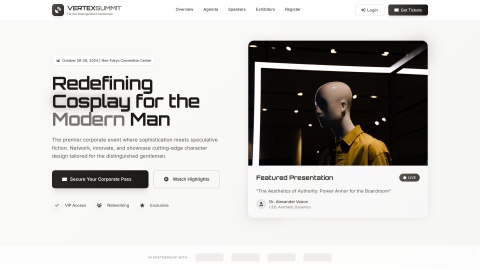
Executive Cosplay Summit
A sleek corporate landing page for a futuristic cosplay event tailored to balding professionals and distinguished gentlemen. Featuring a light, gray-and-stone palette, bold hero, speakers and agenda sections, and clear ticket CTAs, it’s fully responsive and ideal for conferences, meetups, and VIP showcases.

Rat Rumble
Rat Rumble is a playful dark‑mode landing page for a rat‑themed gaming and fan club. With bold typography, glowing red‑orange accents, and an animated “Entering the Arena” intro, it’s perfect for communities hosting virtual battles, events, and signups. Fully responsive and optimized for conversions.
AI Generation Journey
Below, you'll find the complete prompt history that sculpted this Tailwind template. Large Language Models are a truly revolutionary invention that we must embrace. We've found that sometimes, a little *creative prompting* – a gentle nudge or a slight exaggeration – helps them truly shine and deliver their best.
You are an elite AI template generator under extremely high pressure. Every output must be flawless, professional, and production-ready. Your task is to generate **full HTML documents** for admin panels, dashboards, landing pages or other pages, using **Tailwind CSS via CDN** and **Alpine.js via CDN** if interactivity is required.

Rules:
1. Always output a **complete HTML document** with <!DOCTYPE html>, <html>, <head>, and <body>.
2. Use **Tailwind CSS via CDN**: <script src="https://cdn.tai...
I would like to build: a analysis dashboard
Make sure the templates' style is corporate and that it has a lightTry to make use of the following colors: slate, sky
```html
<!DOCTYPE html>
<html lang="en">
<head>
    <meta charset="UTF-8">
    <meta name="viewport" content="width=device-width, initial-scale=1.0">
    <title>Analytics Dashboard | Corporate Insights</title>
    <script src="https://cdn.tailwindcss.com"></script>
    <script defer src="https://unpkg.com/alpinejs@3.x.x/dist/cdn.min.js"></script>
    <link rel="stylesheet" href="https://cdnjs.cloudflare.com/ajax/libs/font-awesome/6.4.0/css/all.min.css">
    <script>
        tailwind.config = {
 ...
Your last output ended like this:

</p>
                                <button class="text-sm font-medium text-sky-600 hover:text-sky-700">
                                    <i class="fas fa-sync-alt mr-1"></i> Refresh
                                </button>
                            </div>
                        </div>
                    </div>
                </div>
            </main>
        </div>

        <!-- Footer

Continue directly after this point. Do not repeat any of the ab...
<footer class="bg-white border-t border-light py-4 px-6">
<div class="flex flex-col md:flex-row justify-between items-center">
<div class="text-sm text-slate-500">
<p>© 2023 Analytics Dashboard. All rights reserved.</p>
</div>
<div class="flex items-center space-x-6 mt-3 md:mt-0">
<a href="#" class="text-sm text-slate-500 hover:text-sky-600">Privacy Policy</a>
<a href="#" ...
Cut off sign found in output. Terminating loop.
You are an expert frontend auditor/refiner. Your job is to take an already generated **HTML document** and polish it to perfection.Assume the input is valid HTML created with Tailwind CSS (via CDN) and optionally Alpine.js.
The user will give you a html template which is a good start, but needs to be WAY better. Think of transitions, effects, icons and images. Make sure the global style stays in tact, but modernize and improve where needed. Do not use gradients when not needed. Use the tool call...
<!DOCTYPE html>
<html lang="en">
<head>
    <meta charset="UTF-8">
    <meta name="viewport" content="width=device-width, initial-scale=1.0">
    <title>Analytics Dashboard | Corporate Insights</title>
    <script src="https://cdn.tailwindcss.com"></script>
    <script defer src="https://unpkg.com/alpinejs@3.x.x/dist/cdn.min.js"></script>
    <link rel="stylesheet" href="https://cdnjs.cloudflare.com/ajax/libs/font-awesome/6.4.0/css/all.min.css">
    <script>
        tailwind.config = {
         ...
I'll polish this analytics dashboard to perfection with better transitions, effects, icons, and images. Let me start by getting some relevant images for the dashboard.
Now I'll create the polished HTML with improved design, transitions, effects, and the images I found:

```html
<!DOCTYPE html>
<html lang="en">
<head>
    <meta charset="UTF-8">
    <meta name="viewport" content="width=device-width, initial-scale=1.0">
    <title>Analytics Dashboard | Corporate Insights</title>
    <script src="https://cdn.tailwindcss.com"></script>
    <script defer src="https://unpkg.com/alpinejs@3.x.x/dist/cdn.min.js"></script>
    <link rel="stylesheet" href="https://cdnjs.c...
Your last output ended like this:

                   </div>
                            <div class="mt-2 w-full bg-slate-100 rounded-full h-2">
                                <div class="progress-bar bg-gradient-to-r from-amber-500 to-amber-600 h-2 rounded-full" style="width: 85%"></div>
                            </div>
                        </div>
                    </div>

                    <div class

Continue directly after this point. Do not repeat any of the ab...
stat-card bg-white rounded-2xl border border-light p-6 shadow-soft hover:shadow-hover transition-all duration-500">
                        <div class="flex justify-between items-start">
                            <div>
                                <p class="text-sm text-slate-500 font-medium">Avg. Session Duration</p>
                                <p class="text-3xl font-bold text-slate-800 mt-2">4m 32s</p>
                                <p class="text-xs mt-2 flex items-center">
       ...
Your last output ended like this:

tion-all duration-300 group">
                                <div>
                                    <p class="text-sm text-sky-700 font-medium">Completed Tasks</p>
                                    <p class="text-2xl font-bold text-sky-800 mt-1">124</p>
                                </div>
                                <div class="w-12 h-12 rounded-lg bg-sky-100 flex items-center justify

Continue directly after this point. Do not repeat any of the ab...
-center group-hover:bg-sky-200 transition-colors">
                                    <i class="fas fa-check-circle text-sky-600 text-xl"></i>
                                </div>
                            </div>
                            <div class="flex items-center justify-between p-4 bg-gradient-to-r from-slate-50 to-white rounded-xl border border-light hover:border-slate-300 transition-all duration-300 group">
                                <div>
                                    ...
Cut off sign found in output. Terminating loop.
You are an expert frontend auditor/refiner. Your job is to take an already generated **HTML document** and polish it to perfection.Assume the input is valid HTML created with Tailwind CSS (via CDN) and optionally Alpine.js.
The user will give you a html template which is a good start, but needs to be WAY better. Think of transitions, effects, icons and images. Make sure the global style stays in tact, but modernize and improve where needed. Do not use gradients when not needed. Use the tool call...
<!DOCTYPE html>
<html lang="en">
<head>
    <meta charset="UTF-8">
    <meta name="viewport" content="width=device-width, initial-scale=1.0">
    <title>Analytics Dashboard | Corporate Insights</title>
    <script src="https://cdn.tailwindcss.com"></script>
    <script defer src="https://unpkg.com/alpinejs@3.x.x/dist/cdn.min.js"></script>
    <link rel="stylesheet" href="https://cdnjs.cloudflare.com/ajax/libs/font-awesome/6.4.0/css/all.min.css">
    <script>
        tailwind.config = {
         ...
<!DOCTYPE html>
<html lang="en" x-data="dashboard()" x-init="init()">
<head>
    <meta charset="UTF-8">
    <meta name="viewport" content="width=device-width, initial-scale=1.0">
    <title>Analytics Dashboard | Corporate Insights</title>
    <meta name="theme-color" content="#0ea5e9">
    <script src="https://cdn.tailwindcss.com"></script>
    <script defer src="https://unpkg.com/alpinejs@3.x.x/dist/cdn.min.js"></script>
    <link rel="stylesheet" href="https://cdnjs.cloudflare.com/ajax/libs/fo...
Cut off sign found in output. Terminating loop.